




MONTHLY WORDPRESS MAINTENANCE REPORTS

See exactly how your WordPress website is being maintained.

A monthly WordPress maintenance report documents the updates, monitoring, backups, security checks, performance data, website traffic, and hands-on work completed during the reporting period.

Every LaunchPad Website Care plan includes a clear monthly report so you can understand what is happening behind the scenes and how your website is being protected.

View the Sample Report Compare Website Care Plans

Included with every plan · Delivered monthly · Written in plain English · Easy to share

Close-up of a laptop with intricate blue digital graphics emanating from it, including gears, circuit board patterns, and glowing lines, symbolizing complex SEO services and digital strategy. This image represents Launchpad Web Designs' comprehensive SEO services for small businesses and freelancers designed to optimize online presence, improve search engine rankings, and drive organic growth.

THE SIMPLE DEFINITION

What is a WordPress maintenance report?

A WordPress maintenance report is a recurring summary of the technical care, monitoring, updates, and improvements performed on a website.

It gives the website owner a documented record of work that may not be visible from the front of the site, including software updates, backup activity, uptime, security monitoring, performance, analytics, and technical recommendations.

A useful report should do more than display automated statistics. It should explain what was completed, identify anything that requires attention, and help the business owner understand the overall health of the website.

A strong maintenance report should answer:

✓ What work was completed?

✓ Was the website updated successfully?

✓ Is the website available and functioning?

✓ Are current backups available?

✓ Were security concerns detected?

✓ How is the website performing?

✓ How are visitors using the website?

✓ Does anything require attention?

Maintenance pricing depends partly on the level of monitoring, reporting, and hands-on support included. See our 2026 WordPress Maintenance Pricing Guide for a complete breakdown.

FREE SAMPLE REPORT

Download a sample WordPress maintenance report.

Review a complete example of the report LaunchPad Website Care clients receive each month.

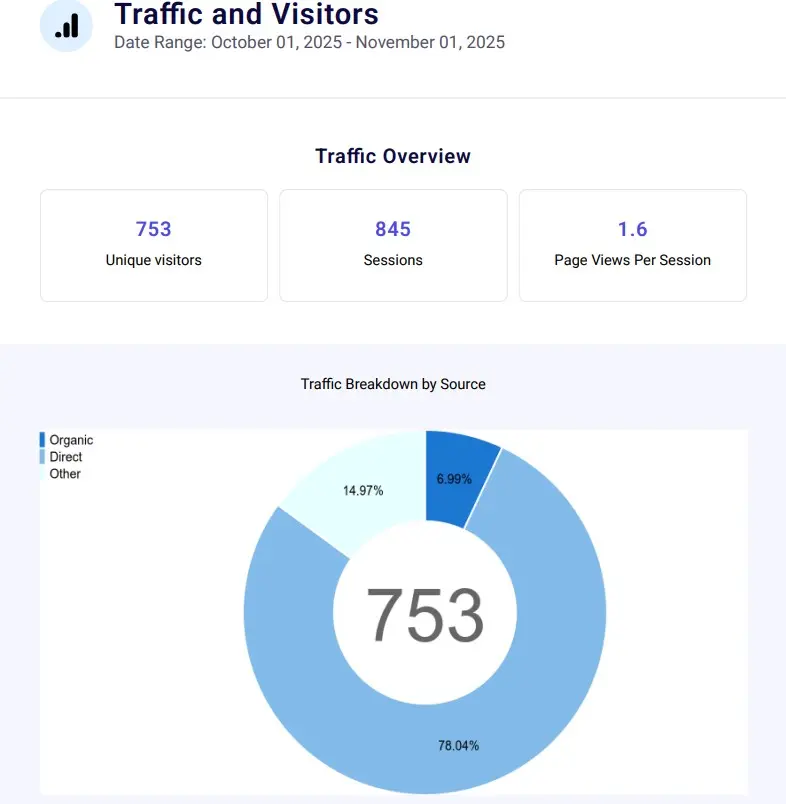
The sample shows how maintenance activity, website health, security, backups, performance, updates, uptime, and visitor information are organized into a clear report for non-technical business owners.

✓ Professionally formatted PDF

✓ Clear explanations without unnecessary jargon

✓ Website health and maintenance overview

✓ Detailed reporting for each monitored area

✓ Useful for internal records and business partners

Download the Sample Report PDF
Sample monthly report metrics

WHAT THE REPORT COVERS

What should a monthly website maintenance report include?

A comprehensive report should show both the work performed and the information used to evaluate the website’s ongoing health. LaunchPad reports cover eight primary areas.

MORE THAN AUTOMATED STATISTICS

Why are website maintenance reports important?

A maintenance report provides transparency, documentation, and context for technical work that business owners might otherwise never see.

TRANSPARENCY

Understand what you are paying for

The report documents the work, monitoring, and protection included in your Website Care service rather than asking you to rely on a vague monthly invoice.

EARLY AWARENESS

Identify changes and concerns

Monitoring data can reveal downtime, performance changes, software vulnerabilities, traffic shifts, or other items that deserve closer attention.

DOCUMENTATION

Create an ongoing maintenance history

Monthly reports provide a useful historical record of software updates, backups, website health, completed work, and technical recommendations.

BUSINESS INSIGHT

See how visitors use your website

Traffic and engagement information helps you understand which pages attract attention and how the website supports your broader business goals.

ACCOUNTABILITY

Confirm ongoing care is happening

You receive tangible evidence that updates, backups, monitoring, maintenance, and agreed website work are being completed.

PEACE OF MIND

Know your website is being watched

Even when no major issue occurs, the report confirms that monitoring remained active and routine care continued throughout the month.

MADE FOR BUSINESS OWNERS

How do you read a WordPress maintenance report?

You do not need to understand WordPress development or technical security terminology. Start with the overview, review any completed work, and then look for notes or recommendations that require your attention.

01

Read the overview

Begin with the summary to understand the website’s overall status and whether anything important occurred during the month.

02

Review completed work

See which updates, fixes, content changes, and other hands-on tasks were completed during the reporting period.

03

Look for changes

Review uptime, security, performance, backups, and visitor activity for changes from the previous reporting period.

04

Check recommendations

Pay particular attention to notes identifying improvements, technical concerns, or decisions that may require your approval.

REPORTING WITH HUMAN CONTEXT

What makes a maintenance report genuinely useful?

Monitoring platforms can generate large amounts of data, but statistics alone do not always explain what happened or whether action is needed.

A useful report combines automated monitoring with human review. LaunchPad adds completed work, relevant explanations, and recommendations so the report provides meaning rather than simply presenting charts and technical measurements.

A useful report provides:

✓ Clear reporting period and website identification

✓ A summary written for the business owner

✓ Documentation of actual work completed

✓ Context for important statistics and changes

✓ Honest reporting when no problems occurred

✓ Explanations of incidents or concerns

✓ Actionable recommendations when appropriate

✓ A way to ask questions about the findings

MONTHLY DELIVERY

When will you receive your Website Care Report?

LaunchPad Website Care Reports are normally delivered by the fifth day of each month and cover activity from the previous calendar month.

For example, a report covering website activity completed during January would normally be delivered by February 5.

The report is sent as a PDF attachment that you can save, print, or share with business partners and other authorized members of your team.

Questions about your report?

Reply directly to the delivery email whenever something needs clarification. The report is intended to make website maintenance easier to understand—not introduce more technical confusion.

If an urgent problem is discovered, LaunchPad does not wait for the monthly report. Important issues are communicated separately when timely attention is required.

USEFUL BEYOND WEBSITE MAINTENANCE

Who can benefit from a website maintenance report?

The report belongs to the client and can be shared with authorized people who need visibility into the website’s maintenance, performance, or technical condition.

BUSINESS OWNERS

Track website health

Understand how the website is being maintained without needing to manage the technical work personally.

BUSINESS PARTNERS

Share clear documentation

Keep partners, managers, or board members informed about website activity and ongoing support.

MARKETING TEAMS

Review traffic activity

Use visitor information and popular-page data to support content, campaign, and marketing decisions.

TECHNICAL PARTNERS

Coordinate website support

Provide useful historical information to authorized IT consultants, developers, or other technical service providers.

COMMON QUESTIONS

WordPress maintenance report FAQs

Learn more about what the report includes, how it is delivered, and how LaunchPad handles important findings.

View All FAQs

A comprehensive report may include completed work, WordPress software updates, backup activity, uptime, security monitoring, website performance, visitor analytics, and recommendations. The exact information depends on the maintenance service and reporting tools being used.

Monthly reporting is appropriate for many small-business websites because it provides regular documentation without overwhelming the owner with daily technical notifications. High-traffic or business-critical websites may require more frequent operational communication in addition to a monthly summary.

Yes. Every LaunchPad Website Care plan includes a Monthly Website Care Report. Some information, such as expanded analytics or hands-on work, may vary according to the selected plan and services included.

Yes. A sample LaunchPad WordPress maintenance report is available as a downloadable PDF on this page. It demonstrates the report structure, presentation, and types of information clients receive.

Yes. The report belongs to you and may be shared with authorized business partners, employees, board members, consultants, or other professional advisers. Reports can also be delivered to additional approved email addresses when requested.

Urgent concerns are handled or communicated when they are discovered rather than being held until the monthly report. The report then documents the issue, the action taken, and any additional recommendation. Non-urgent concerns are explained along with their potential impact and suggested next steps.

Yes. A quiet month is still worth documenting. The report confirms that monitoring remained active, backups were created, routine maintenance was completed, and no significant incidents were detected during the reporting period.

Monitoring and maintenance platforms provide much of the underlying data, but LaunchPad reports also include hands-on work, relevant explanations, and recommendations. This gives the automated information useful human context.

No. LaunchPad Website Care Reports are written for business owners rather than WordPress developers. Technical information is organized clearly, and you can reply directly to the report email whenever something needs further explanation.

ONGOING WORDPRESS SUPPORT

Monthly reporting is included with every LaunchPad Website Care plan.

Website Care combines reporting with updates, backups, uptime monitoring, security monitoring, direct support, and additional hands-on assistance based on the selected plan.

Compare Website Care Plans

KNOW WHAT IS HAPPENING WITH YOUR WEBSITE

Get dependable WordPress care with clear monthly reporting.

Tell LaunchPad about your website and the support you currently need. You will receive an honest Website Care recommendation and transparent monthly pricing before service begins.

Request a Website Care Recommendation Download the Sample Report