

FREE WORDPRESS SEO AUDIT TOOL

Find out what may be limiting your WordPress website’s search visibility.

Run a free automated SEO audit to check your website for technical concerns, performance problems, mobile issues, on-page optimization gaps, and other signals that may affect visitors and search engines.

Your results are presented in clear language so you can understand what was found, why it may matter, and which areas deserve closer attention.

Run My Free SEO Audit Learn What the Audit Checks

Free automated scan · No credit card · Read-only analysis · Results in about 60 seconds

Image of a man sitting in front of a laptop running a free wordpress seo audit on his website.

THE SIMPLE DEFINITION

What is a WordPress SEO audit?

A WordPress SEO audit is an evaluation of website factors that may affect how search engines access, understand, index, and present a WordPress site.

An automated audit can quickly identify common technical, performance, mobile, security, and on-page concerns. It can also highlight areas that may require further investigation before changes are made.

The audit does not change your website. It reviews publicly available information and returns a report explaining the signals detected during the scan.

The audit can help answer:

✓ Can search engines access the website?

✓ Are important SEO elements present?

✓ Does the site perform well on mobile?

✓ Are loading-speed concerns detected?

✓ Is the page structure clear?

✓ Are security or accessibility concerns visible?

✓ Which areas may deserve attention first?

WHAT THE FREE SEO AUDIT CHECKS

Review important website signals across several key areas.

The audit organizes its findings into clear categories so you can see where potential concerns were detected and understand how different parts of the website work together.

CLEAR, PRIORITIZED RESULTS

See more than a single SEO score.

Your report groups the findings into understandable categories and explains what each detected issue may mean for your website.

Rather than treating every warning as equally important, the report helps distinguish stronger concerns from lower-priority opportunities.

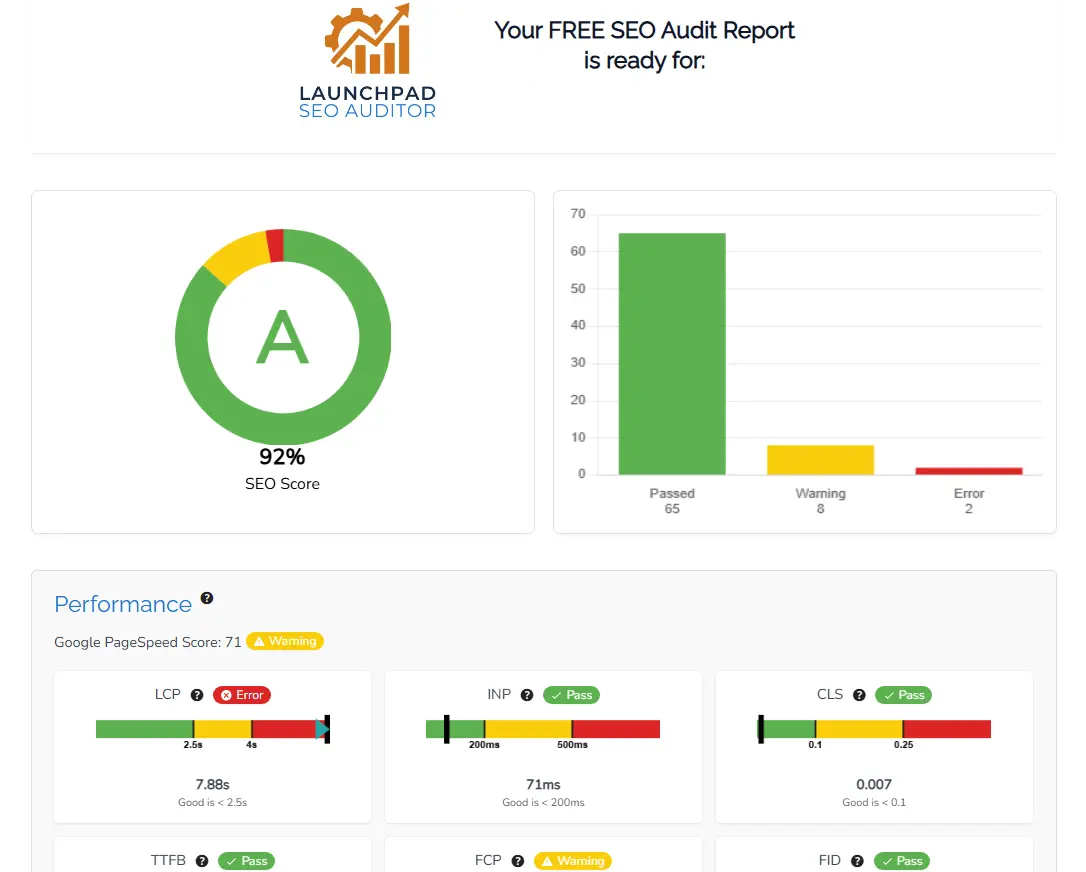
✓ Overall audit score and summary

✓ Individual checks and findings

✓ Plain-language explanations

✓ Priority and severity indicators

✓ Passed checks as well as concerns

✓ Guidance for reviewing next steps

Run the Free Audit
Example WordPress SEO audit report showing technical and speed issues

Example of a report section using sample data.

SIMPLE AND READ-ONLY

How does the free WordPress SEO audit work?

No software is installed and no administrator access is required. The tool analyzes publicly available website information and generates your report automatically.

01

Enter your website

Provide your contact details and the public URL of the WordPress website you would like to review.

02

The tool scans the page

The read-only audit reviews available website signals without logging in, installing software, or changing content.

03

Review your results

Your report presents the audit score, passed checks, detected concerns, explanations, and priority information.

04

Choose your next step

Use the results to investigate concerns, make appropriate changes yourself, or request professional assistance.

A close-up of two hands connecting white puzzle pieces, representing the process of creating a unique and custom web design solution for businesses whose needs go beyond standard pricing plans. Contact us for a tailored website

CREATED BY A WORDPRESS PROFESSIONAL

Why did LaunchPad create a free WordPress SEO audit?

I’m Toby, owner and lead designer of LaunchPad Web Designs. After working with WordPress websites for more than 12 years, I repeatedly encountered business owners who did not know whether their websites had technical or optimization concerns.

Many SEO platforms are designed for marketers and developers, which can make their reports confusing for people who simply want to understand the condition of their website.

I created this audit to offer a more approachable starting point. It helps you identify common signals before deciding whether a professional review or paid SEO work makes sense for your business.

Learn More About LaunchPad

WHAT AN AUTOMATED AUDIT CANNOT DO

The audit identifies signals. It does not replace a complete SEO strategy.

An automated report is useful for identifying common concerns quickly, but it cannot fully understand your business, customers, competitors, market, content quality, or conversion goals.

It also cannot determine with certainty whether every detected warning is harming your search visibility. Findings should be reviewed in context before major website changes are made.

A professional SEO review can also evaluate:

✓ Business and marketing goals

✓ Customer search intent

✓ Keyword and topic opportunities

✓ Competitor visibility

✓ Website content quality

✓ Local search presence

✓ Google Search Console data

✓ Analytics and conversions

✓ Website-wide technical conditions

✓ Priorities based on likely impact

YOUR REPORT, YOUR DECISION

What can you do after receiving the audit?

The free audit does not require you to purchase a service. Use the results in the way that is most useful for your website and business.

OPTION 1

Investigate and make changes yourself

Use the report as a starting point for researching the detected concerns and correcting appropriate items within WordPress.

OPTION 2

Request a professional review

Ask LaunchPad to evaluate the results in context and recommend which issues should be addressed first.

OPTION 3

Keep the report for future reference

Save the findings and revisit them when you are ready to improve, redesign, or invest in your website’s search visibility.

WHO SHOULD USE THE TOOL?

The audit is designed for WordPress website owners who need a clearer starting point.

It can be useful whether your website is new, established, underperforming, or preparing for a larger SEO or redesign project.

SMALL BUSINESS OWNERS

Understand your website more clearly

See whether common technical, performance, or optimization concerns appear on an important business page.

FREELANCERS & PROFESSIONALS

Review the website supporting your work

Identify potential gaps that may make it harder for prospective clients to discover or use your website.

NEW WEBSITE OWNERS

Check the foundation after launch

Review important page signals before the website accumulates more content, plugins, traffic, and technical complexity.

EXISTING WEBSITE OWNERS

Investigate limited search visibility

Use the scan as an initial step when a website receives little organic traffic or appears to be underperforming.

WOOCOMMERCE STORES

Check important store pages

Review publicly available signals on a WooCommerce page before pursuing a broader ecommerce SEO evaluation.

WEBSITE REDESIGN CLIENTS

Document concerns before rebuilding

Identify visible technical and on-page issues that may need to be considered during an upcoming redesign or migration.

COMMON QUESTIONS

Free WordPress SEO audit FAQs

Learn what the tool checks, how it works, what information it requires, and how to interpret the results.

View All FAQs

Yes. There is no charge to run the automated audit, and no credit card is required. You may receive communication related to your report and available LaunchPad services, but you are not required to purchase anything.

The audit reviews a collection of technical SEO, performance, mobile usability, on-page optimization, security, accessibility, and website-structure signals. The report identifies passed checks as well as potential concerns detected during the scan.

The automated scan normally takes about 60 seconds, although timing can vary according to the website, server response, and availability of the services used to complete the analysis.

No. The audit is read-only. It analyzes publicly accessible website information without installing software, logging into WordPress, or modifying your pages, plugins, theme, or settings.

No. The free audit does not require WordPress administrator access, hosting access, or your password. Never provide website passwords through an unsecured form unless access is specifically required for an approved service.

No. An SEO plugin helps manage settings and optimize content within WordPress. The audit independently reviews publicly available website signals and may detect concerns outside the information displayed by an installed plugin.

The audit analyzes the public page generated by WordPress rather than requiring a specific builder. It can therefore review pages created with common WordPress themes and builders, although the exact findings depend on the final page output and technical configuration.

Yes. WooCommerce websites run on WordPress, so the tool can review publicly accessible store pages. A single-page automated audit does not replace a complete WooCommerce SEO review covering products, categories, filters, structured data, checkout functionality, and the entire store architecture.

It can identify common signals that may contribute to limited visibility, but it cannot determine every reason a website does not rank. Search demand, competition, content quality, authority, location, website history, backlinks, and search intent also influence visibility.

No. A high score indicates that the audited page passed many of the tool’s checks. It does not guarantee that the page targets valuable searches, meets customer needs, competes effectively, earns trust, or will achieve a particular ranking.

Not necessarily. A lower score means the tool detected more concerns or missing signals. Each finding should be reviewed to determine whether it is accurate, relevant, and worth correcting within the context of your website.

No. The free tool provides an automated review of selected signals. A professional SEO audit can also include Search Console data, analytics, keyword research, competitor analysis, local SEO, content quality, backlinks, website-wide crawling, conversion goals, and human interpretation.

Begin by reading the explanation and confirming that the issue applies to your website. Research appropriate solutions or ask a qualified professional to review the finding before making major technical changes. LaunchPad can also provide a professional review and estimate when needed.

It can be useful to run an audit after a website launch, redesign, migration, theme change, major plugin change, or significant content update. Periodic reviews can also help identify new issues, but the ideal frequency depends on how active and important the website is.

Your submitted information is used to provide the audit and communicate about the report or related LaunchPad services. Additional details about data handling should be explained in LaunchPad’s Privacy Policy.

NEED MORE THAN AN AUTOMATED REPORT?

Turn your audit findings into a practical WordPress SEO plan.

LaunchPad provides professional WordPress SEO services covering technical improvements, on-page optimization, local SEO, content strategy, performance, implementation, and measurement.

Explore WordPress SEO Services

START WITH A CLEARER PICTURE

See what the free audit discovers about your WordPress website.

Enter your website URL to receive an automated report covering technical SEO, performance, mobile usability, on-page optimization, security, accessibility, and website structure.

Run My Free SEO Audit Discuss Professional SEO Help