No products in the cart.
Not sure what you need?
Tell me about your website. I'll help you find the right next step.

MONTHLY WORDPRESS MAINTENANCE REPORTS
Every LaunchPad Website Care plan includes a monthly report documenting WordPress updates, backups, uptime, security monitoring, performance, and maintenance work. It makes the technical work behind your website understandable and accountable.
Included in every plan · Delivered monthly · Easy-to-read PDF · Direct answers to your questions

CLEAR REPORTING, NOT JUST AUTOMATED NUMBERS
A WordPress maintenance report is a regular record of the care performed on your website. It helps you see what was updated, whether backups and monitoring are working, and whether anything needs attention.
LaunchPad combines information from maintenance tools with details of completed work and practical explanations. You do not need technical experience to understand the report.
✓ Which WordPress updates and website changes were completed?
✓ Were backups created and uptime monitored?
✓ Were security or performance concerns identified?
✓ What do the results mean for my business?
✓ Is there anything I need to approve or address?
SEE A REALISTIC EXAMPLE
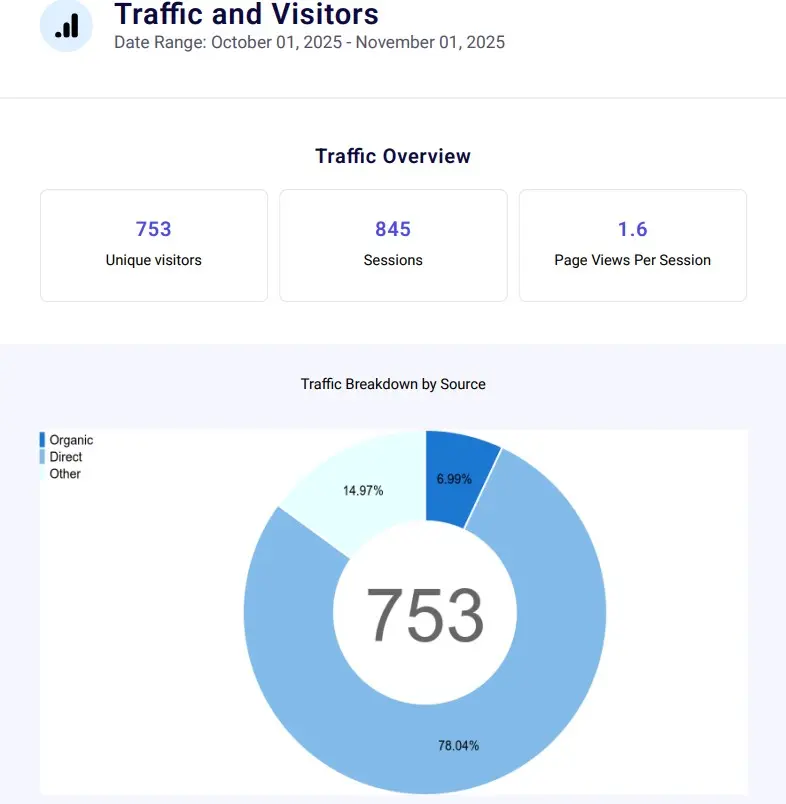
Preview the PDF format and the types of updates, website health data, and maintenance activity included in LaunchPad’s reports. The sample is designed to show how technical information becomes a useful business record.
No sign-up required. Open the example and see what ongoing Website Care looks like.
WHAT THE REPORT COVERS
Each report covers the services and measurements relevant to your Website Care plan. The information typically falls into six practical categories.
01 · MAINTENANCE
WordPress core, theme, and plugin updates, along with any fixes, content changes, and hands-on work included in your plan.
02 · BACKUPS
Backup activity and available recovery protection so you know whether your website is being backed up as scheduled.
03 · AVAILABILITY
Website availability during the reporting period, including monitored downtime and relevant service interruptions.
04 · PROTECTION
Known vulnerabilities, security alerts, SSL or domain monitoring, and notable issues that require attention.
05 · PERFORMANCE
Performance observations and, where included in your plan, website traffic, popular pages, and visitor trends.
06 · NEXT STEPS
Plain-English explanations of significant changes, unresolved concerns, and recommended improvements.
SIMPLE MONTHLY DELIVERY
Reports normally arrive by the fifth day of the following month and summarize the previous calendar month’s activity. For example, January’s report would normally arrive by February 5.
Your PDF can be saved or shared with authorized members of your team. If something needs clarification, simply reply to the report email and ask me directly.
Urgent issues are addressed or communicated when discovered rather than held for the next report.
1. Start with the overview. See the website’s overall condition.
2. Review completed work. Check the updates and requests handled.
3. Look for changes. Review uptime, security, backups, and performance.
4. Check recommendations. See whether anything needs your attention.
COMMON QUESTIONS
Quick answers about monthly reporting and what you can expect from LaunchPad Website Care.
Yes. Every LaunchPad Website Care plan includes a monthly PDF report. The detail can vary by plan, particularly for visitor analytics and hands-on work.
Reports normally arrive by the fifth day of each month and summarize the previous calendar month.
Yes. You can download the sample WordPress maintenance report PDF on this page without signing up.
No. Reports are organized for business owners and include straightforward explanations. You can reply to the delivery email with questions.
Important issues are handled or communicated when they are identified, rather than being left until the monthly report. Actions taken and any remaining recommendations can then be documented in the report.
Yes. The PDF can be saved and shared with authorized partners, staff, or technical advisers.
 WordPress Website Design
 WordPress Maintenance
 WordPress SEO
 Freelancer Website Design
 Website Support
 Website & SEO Articles
 Free Website Starter Kit
 Free WordPress SEO Audit
 Frequently Asked Questions
 Press & Company News