
No products in the cart.
WordPress Maintenance
WordPress Maintenance Checklist for 2026: Complete Schedule
WORDPRESS MAINTENANCE GUIDE
WordPress Maintenance Checklist for 2026: Weekly, Monthly, Quarterly, and Annual Tasks
Use this practical WordPress maintenance checklist to organize updates, backups, security, performance, content reviews, SEO checks, and long-term website planning.
Updated for 2026 · WordPress maintenance · Website Care · Small-business websites
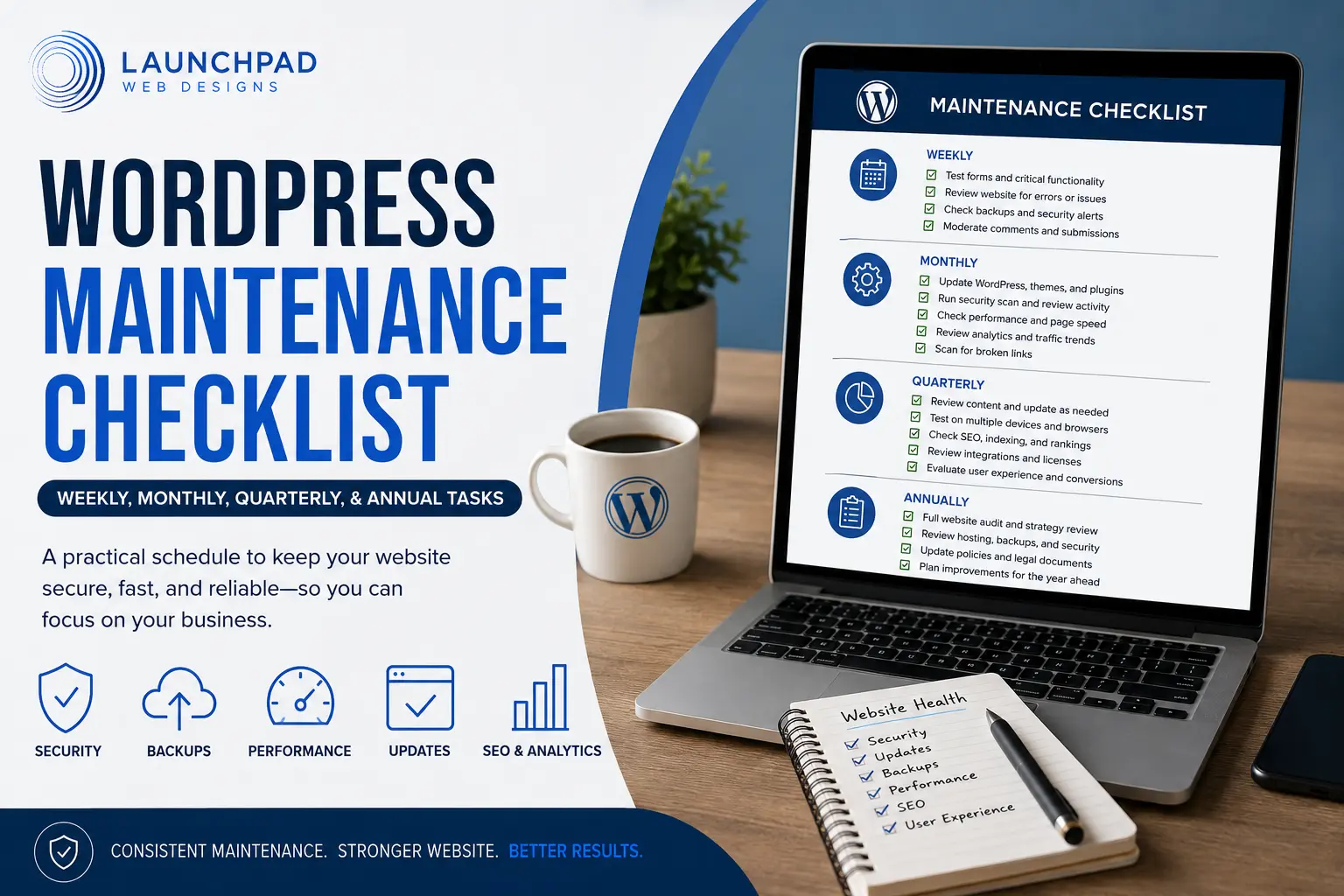
A WordPress website rarely fails because of one dramatic mistake. Problems usually develop gradually: an update is postponed, a backup stops running, a form breaks without anyone noticing, or an expired plugin license prevents an important security update.
A maintenance schedule helps prevent routine responsibilities from being forgotten. It also gives you a repeatable way to check whether the website remains secure, functional, fast, accurate, and useful to visitors.
This guide organizes WordPress maintenance into continuous, weekly, monthly, quarterly, and annual tasks. Not every website needs every task at exactly the same interval. A simple five-page service website and a busy WooCommerce store have very different levels of risk and activity.
For a broader explanation of ongoing maintenance services, read What Is a WordPress Maintenance Plan?. For current pricing considerations, see the WordPress Maintenance Cost in 2026 guide.
In This Guide
View the article sections
Quick maintenance schedule
Continuous and automated monitoring
Weekly WordPress maintenance tasks
Monthly WordPress maintenance tasks
Quarterly WordPress maintenance tasks
Annual WordPress maintenance tasks
WooCommerce maintenance checklist
Tasks you can handle versus professional help
Common maintenance mistakes
Frequently asked questions
THE QUICK ANSWER
How often should a WordPress website be maintained?
Most business websites need automated monitoring every day, a brief functional review each week, technical maintenance each month, a broader website review each quarter, and a strategic audit at least once per year.
CONTINUOUS
Automated monitoring
Uptime, backups, malware or security alerts, failed login activity, expired SSL certificates, and critical errors.
WEEKLY
Functional checks
Forms, important pages, recent backups, visible errors, pending comments, and urgent software notices.
MONTHLY
Technical maintenance
Updates, security review, performance testing, database cleanup, analytics, broken links, and account review.
QUARTERLY
Content and experience review
Review core pages, mobile layouts, navigation, calls to action, integrations, licenses, accessibility, SEO, and conversion paths.
ANNUALLY
Strategic website audit
Assess hosting, technology, design, content, privacy documents, security procedures, performance, goals, and whether a redesign is approaching.
CONTINUOUS MAINTENANCE
Tasks that should run automatically
Some website conditions can change at any time. Automated systems can identify problems sooner than a calendar-based manual review.
□ Monitor website uptime
Receive an alert when the website becomes unavailable or begins returning server errors.
□ Run scheduled off-site backups
Back up both the database and website files. A database-only backup does not contain every theme, plugin, image, or custom file needed to rebuild the site.
□ Monitor security and malware alerts
Use appropriate security monitoring to flag suspicious changes, blocked attacks, unexpected administrator accounts, or modified files.
□ Monitor SSL certificate status
An expired or misconfigured certificate can trigger browser warnings and prevent visitors from trusting or using the site.
□ Watch for fatal errors
WordPress recovery messages, PHP errors, failed scheduled actions, and server alerts may reveal issues before visitors report them.
WEEKLY WORDPRESS MAINTENANCE TASKS
Confirm that visitors can still use the website
A weekly review should be brief and practical. Its purpose is to catch visible or business-critical problems before they remain unnoticed for several weeks.
□ Test important forms
Submit contact, estimate, appointment, registration, newsletter, and lead-generation forms. Confirm that the success message appears and that the notification reaches the correct inbox. A form can look normal while email delivery has stopped.
□ Review the website from the front end
Open the homepage, contact page, primary service pages, and any current promotions. Look for missing images, broken layouts, unexpected notices, incorrect pricing, or buttons that no longer work.
□ Confirm that backups are completing
Do not assume an automated backup is working merely because it was configured once. Review the latest completion date, storage destination, retained copies, and any warning messages.
□ Review urgent update or security notices
Not every update must be installed the moment it appears, but known security releases and actively exploited vulnerabilities deserve prompt attention. Back up the site and assess compatibility before applying substantial changes.
□ Moderate comments and submissions
Remove spam, review legitimate comments, check form-entry storage, and ensure important customer messages have not been missed.
MONTHLY WORDPRESS MAINTENANCE TASKS
Complete the core technical maintenance
Monthly maintenance is where the main technical work usually happens. High-activity or higher-risk websites may need these tasks more frequently.
1. Create or confirm a current backup
Before performing updates, confirm that a usable backup exists. The backup should include the database, uploads, themes, plugins, and other files necessary to restore the website.
2. Update WordPress core
Apply supported WordPress releases after reviewing the update and confirming backups. Minor and security releases may install automatically, but the website should still be checked afterward.
3. Update plugins and themes
Review update notes, compatibility information, active licenses, and recent support reports. Update in manageable groups so the source of a new problem is easier to identify.
4. Test the website after updates
Review the homepage, navigation, forms, account areas, galleries, popups, mobile layout, search, and any feature directly affected by the updated software.
5. Review security activity
Look for repeated login attempts, blocked IP addresses, modified files, new administrator accounts, outdated software, exposed usernames, and unusual traffic patterns.
6. Run a performance review
Test important pages rather than only the homepage. Look for unusually large images, slow third-party scripts, cache problems, database overhead, layout shifts, and changes in server response time.
7. Find broken links and missing pages
Check important internal and external links. Repair incorrect URLs, replace discontinued resources, and redirect deleted pages when an appropriate replacement exists.
8. Review analytics and search data
Look for significant traffic changes, pages losing visibility, unusual referral traffic, indexing concerns, declining conversions, or important pages receiving little engagement.
9. Clean unnecessary website data
Remove unused plugins and themes after confirming they are unnecessary. Review excessive revisions, expired transients, abandoned drafts, spam, logs, and temporary files without deleting data the website still needs.
10. Review users and administrator access
Remove obsolete accounts, reduce unnecessary administrator privileges, confirm that staff still need access, and encourage strong passwords and multifactor authentication where available.
Document what was completed each month
A maintenance report creates a record of updates, backups, monitoring, performance results, security activity, completed work, and issues that still require attention.
See What a Monthly Maintenance Report IncludesQUARTERLY WORDPRESS MAINTENANCE TASKS
Review the complete customer experience
Quarterly maintenance looks beyond software. It asks whether the website still represents the business accurately and helps visitors complete the intended action.
□ Review your most important pages. Check services, pricing, biographies, hours, contact details, policies, promotions, locations, credentials, and calls to action.
□ Test the website on current devices. Review representative mobile, tablet, laptop, and desktop layouts. Pay special attention to menus, forms, buttons, tables, popups, and sticky elements.
□ Review accessibility basics. Check heading order, keyboard navigation, alternative text, link descriptions, form labels, contrast, readable type, focus indicators, and captions where relevant.
□ Review navigation and internal links. Confirm that visitors can reach the most important information without unnecessary steps and that related pages connect logically.
□ Check third-party integrations. Test scheduling systems, CRM connections, payment services, maps, review widgets, email marketing forms, social feeds, analytics, and embedded tools.
□ Review plugin and service licenses. Expired licenses may block updates or support. Remove products no longer in use and confirm billing information for essential services.
□ Review on-page SEO. Check titles, descriptions, headings, page topics, internal links, image descriptions, crawlability, indexing, and outdated content on priority pages.
□ Review conversion paths. Follow the same steps a prospective customer would take from a landing page to an inquiry, appointment, purchase, registration, or phone call.
ANNUAL WORDPRESS MAINTENANCE TASKS
Step back and evaluate the entire website
An annual review should consider whether the website’s technology, design, content, and strategy still support the current business.
□ Review hosting performance, storage, traffic allowances, backups, support, renewal pricing, and server technology.
□ Review the active theme, plugins, custom code, PHP version, database version, and compatibility risks.
□ Test a complete backup restoration in a safe environment when practical.
□ Review privacy, terms, return, purchase, cookie, accessibility, and other policies with the appropriate professionals.
□ Audit important content for outdated claims, discontinued services, former staff, obsolete statistics, broken sources, and inaccurate business details.
□ Review analytics goals, conversion tracking, consent settings, Search Console access, and ownership of connected accounts.
□ Evaluate whether navigation, branding, messaging, mobile usability, accessibility, and conversion paths still meet current expectations.
□ Create a prioritized website-improvement plan for the next 12 months.
WOOCOMMERCE MAINTENANCE CHECKLIST
Online stores require additional testing
A WooCommerce store changes continuously as orders, customers, inventory, coupons, taxes, and payment records are created. Maintenance frequency should reflect the store’s sales volume and operational importance.
Store functions to test
□ Product and variation selection
□ Cart additions and removals
□ Coupon codes and discounts
□ Shipping methods and rates
□ Tax calculations
□ Guest and account checkout
□ Payment gateway transactions
□ Customer and administrator emails
□ Order confirmation pages
□ Refund and cancellation processes
Store data to review
□ Failed and pending orders
□ Inventory accuracy
□ Expired sales and coupons
□ Product pricing and availability
□ Abandoned scheduled actions
□ Payment and API logs
□ Subscription renewals, if applicable
□ Download permissions
□ Customer account access
□ Store-specific backup frequency
DIY OR PROFESSIONAL MAINTENANCE?
Which tasks can a business owner handle?
Business owners can perform many routine checks, but the risk increases when a task involves server configuration, database work, security incidents, custom code, complex updates, or business-critical transactions.
Often manageable in-house
✓ Review pages for outdated information
✓ Test forms and buttons
✓ Moderate comments
✓ Check business hours and contact information
✓ Publish and update content
✓ Review analytics summaries
✓ Check that backups show recent completion
✓ Report unexpected visual or functional changes
Often better handled professionally
✓ Troubleshoot failed updates
✓ Restore a broken or compromised site
✓ Resolve malware or security incidents
✓ Diagnose PHP and database errors
✓ Test major updates in staging
✓ Repair plugin and theme conflicts
✓ Improve server and caching configuration
✓ Maintain complex WooCommerce functionality
LaunchPad’s Website Care plans provide recurring WordPress maintenance, monitoring, reporting, and support. Separate assistance is also available through WordPress support services.
Compare WordPress Maintenance PlansCOMMON WORDPRESS MAINTENANCE MISTAKES
A checklist only works when it is followed carefully
Common Maintenance Mistakes
Updating everything without a current backup
Updates are necessary, but they can introduce compatibility problems. Confirm that both website files and the database are backed up before substantial updates.
Assuming that an automated backup can be restored
A successful backup notification confirms that a process completed; it does not prove the backup contains everything needed or that the restoration procedure works. Periodic restore testing provides stronger assurance.
Installing updates without testing the website afterward
An update can succeed technically while breaking a form, layout, payment method, integration, or front-end feature. Test business-critical functions after maintenance.
Keeping unused plugins and themes installed
Deactivated software can still become outdated and may increase the number of components that require monitoring. Remove unnecessary software after confirming it is not needed for the website.
Treating maintenance as updates only
Software updates are one part of maintenance. Backups, security, uptime, forms, performance, content accuracy, integrations, accessibility, and SEO also need regular attention.
Making major changes directly on a live website
Substantial updates, PHP changes, redesigns, custom development, and complex WooCommerce work are usually safer when tested in a staging or development environment first.
Ignoring maintenance reports and warnings
A report is useful only when someone reviews the findings and acts on unresolved issues. Repeated backup failures, storage warnings, outdated software, and performance declines should not be carried forward indefinitely.
BUILD YOUR MAINTENANCE SCHEDULE
Adjust the frequency to the website’s risk
A maintenance schedule should reflect how often the website changes, how quickly data accumulates, how essential the website is to the business, and how much disruption the business can tolerate.
Lower-activity brochure website:
Monthly technical maintenance with weekly form and availability checks may be sufficient.
Active lead-generation website:
More frequent form, integration, content, and conversion testing may be appropriate.
Membership or appointment website:
Account access, scheduling, email notifications, and payment functions should be tested regularly.
WooCommerce store:
Backup and monitoring frequency may need to reflect daily—or even continuous—changes in orders, customers, and inventory.
SEO AND WEBSITE MAINTENANCE
Maintenance supports SEO, but does not guarantee rankings
A technically maintained website is easier to keep crawlable, mobile-friendly, fast, accurate, and free of preventable errors. Those qualities support search visibility, but routine maintenance alone does not guarantee that Google will index a page or rank it for a particular search.
SEO also depends on the usefulness of the content, competition, search intent, authority, internal links, local signals, and many other factors. Use maintenance reviews to identify technical and content concerns, then address them through a broader SEO strategy.
FREQUENTLY ASKED QUESTIONS
WordPress maintenance checklist FAQs
WordPress Maintenance FAQs
How often should I update WordPress plugins?
Review plugin updates regularly rather than allowing them to accumulate for months. Security updates may require prompt attention, while substantial feature updates may need compatibility research and staging tests. Always confirm that a current backup exists before updating important website software.
Should WordPress maintenance be completed weekly or monthly?
Both intervals can be appropriate for different tasks. Forms, uptime, visible errors, and backup completion should generally be checked weekly or monitored automatically. Technical updates, performance reviews, security reviews, and broader testing are commonly completed monthly. Active or business-critical websites may require more frequent attention.
Does WordPress update itself automatically?
WordPress can automatically apply certain background, maintenance, and security updates. Plugins and themes can also be configured for automatic updates. Automatic installation does not eliminate the need for backups, compatibility review, monitoring, and post-update testing.
How often should a WordPress website be backed up?
The correct frequency depends on how often the website changes. A relatively static service website may use daily or weekly backups, while a busy store, membership site, or booking website may require more frequent backups because new orders, customer records, and transactions are continually being created.
What is the most important WordPress maintenance task?
No single task covers every risk, but dependable backups are fundamental because they provide a recovery path when an update, security problem, server failure, or human error damages the site. Backups should be combined with updates, monitoring, security, and functional testing.
Can I maintain my WordPress website myself?
Yes, many business owners can manage routine content checks, form testing, and basic updates. Professional assistance becomes more valuable when the website contains custom code, ecommerce, memberships, business-critical integrations, complex hosting, security concerns, or recurring compatibility problems.
Does website maintenance improve WordPress security?
Maintenance can reduce avoidable risk by keeping supported software updated, removing unnecessary components, monitoring suspicious activity, reviewing user access, and maintaining backups. No maintenance process can guarantee that a website will never experience a security incident.
What should be included in a WordPress maintenance report?
A useful report may document completed updates, backup status, uptime, security activity, performance results, website checks, support work, unresolved concerns, and recommendations. The exact report should reflect the services included in the maintenance plan.
Do WooCommerce stores need more maintenance?
Usually, yes. Stores rely on payment gateways, shipping, taxes, inventory, transactional emails, customer accounts, order records, and extensions that must continue working together. Store data may also change throughout the day, requiring more frequent backups and transaction testing.
How do I know whether my WordPress website needs professional maintenance?
Professional maintenance may be appropriate when updates are repeatedly postponed, backups are not being checked, technical errors are appearing, the site generates important leads or revenue, no one is monitoring availability, or the business lacks the time and experience to respond when something breaks.
ONGOING WORDPRESS WEBSITE CARE
Keep maintenance from becoming another unfinished task
LaunchPad Website Care combines routine WordPress maintenance, backups, monitoring, reporting, and support in a recurring plan designed for small-business websites.
Explore Website Care
Compare Base, Essential, and Elite plans and see which level of ongoing support fits your website.
Compare WordPress Maintenance Plans