
No products in the cart.
Online Presence
Who Owns Your Website? Website Ownership Guide (2026)
WEBSITE OWNERSHIP GUIDE
Who Owns Your Website After It’s Built? Website Ownership Explained for 2026
Paying for a website does not automatically answer every ownership question.
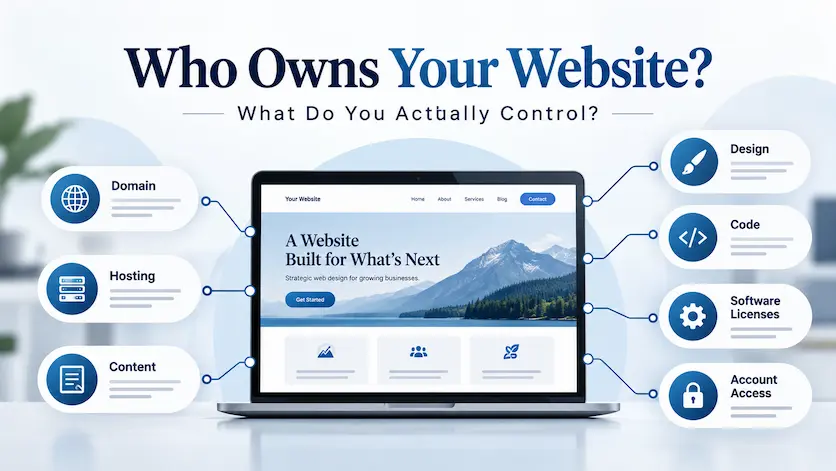
A business website is made up of several different things: your domain registration, hosting account, content, branding, design work, custom code, software licenses, third-party services, and administrator access.
Some of those may belong to you. Some may be licensed to you. Some may belong to a platform or software developer. And some depend entirely on what your contract says.
This guide explains the practical differences so you know what to ask for before, during, and after a web design project.
THE QUICK ANSWER
Who owns a website after a freelancer builds it?
It depends on the component and the contract.
A business should generally aim to control its domain registration, hosting or platform account, administrator access, business content, and customer data. Copyright in original design, copy, photography, or custom code may depend on who created it and what rights were transferred in writing.
Third-party software, stock images, fonts, themes, plugins, SaaS platforms, and other licensed tools usually remain subject to their own license terms rather than becoming the client’s exclusive property.
The safest approach is to define ownership, licensing, account control, and handoff responsibilities in writing before the project begins.
THE OWNERSHIP CHECKLIST
Domain — Who is the registrant?
Hosting/platform — Whose account is it?
Content — Who created it?
Design — What rights are transferred?
Code — Custom or third-party?
Plugins/themes — What licenses apply?
Admin access — Can you control the site?
Portability — Can you move elsewhere?
Important: This article provides general business and website-planning information, not legal advice. Copyright, contract, employment, and intellectual-property rules can vary by country and situation. For a dispute or high-value intellectual-property question, consult a qualified attorney in the appropriate jurisdiction.
In This Guide
Website ownership is really a bundle of rights
Who should control the domain?
Who should control hosting and accounts?
Who owns website content and branding?
Who owns the design and custom code?
How WordPress themes and plugins affect ownership
What changes with Wix or Squarespace?
What your web design contract should clarify
What you should receive at handoff
Website ownership red flags
Frequently asked questions
START WITH THE RIGHT QUESTION
Website ownership is really a bundle of different rights and controls
People often ask, “Who owns the website?” as if a website were one object.
It is not.
A typical business website combines material created by the client, original work created by the designer, open-source software, licensed commercial software, third-party services, hosting infrastructure, a domain registration, and accounts controlled by different companies.
That means the better question is:
“Which parts do I own, which parts do I license, and which accounts do I control?”
A website may include
Domain registration
Hosting account
CMS account
Written copy
Photography
Logo and brand assets
Original design work
Custom code
WordPress core
Themes and plugins
Fonts
Stock imagery
Analytics accounts
Email or CRM integrations
DOMAIN CONTROL
Your business should know the registrar account
✓ Registrar name
✓ Registrant/contact information
✓ Account login
✓ Recovery email
✓ Renewal method
✓ Transfer access
✓ DNS access
DOMAIN NAME
Who should control your domain name?
Your domain is one of the most important pieces of your online presence.
Technically, a domain registrant enters into a registration agreement with a registrar. The registrant has contractual rights and responsibilities for managing and maintaining that registration.
For a business website, the safest practical setup is usually for the business itself to control the registrar account and recovery information, rather than leaving the domain exclusively inside a designer’s personal account.
Your designer may manage DNS or technical settings for you, but you should know where the domain is registered and how the business can regain control if the working relationship ends.
HOSTING & ACCOUNT CONTROL
Account access is not the same thing as copyright ownership
You can own copyright in content and still be locked out of the account where the website runs.
That is why operational control matters separately from legal ownership.
For important services, the business should know who owns or controls the account, who receives billing notices, and how access can be recovered.
This commonly includes hosting, WordPress administrator access, domain registration, analytics, Search Console, email marketing, ecommerce, payment gateways, appointment systems, and other services connected to the website.
ASK THIS FOR EVERY ACCOUNT
Whose email created it?
Who receives billing?
Who controls recovery?
Can the business add/remove users?
What happens if the designer leaves?
CONTENT & BRAND ASSETS
Who owns the text, photos, logo, and other website content?
If your business already owns or properly licenses material before the web project begins—such as your logo, photographs, written copy, product information, or videos—the designer does not normally gain ownership merely because those materials are placed on the website.
But content created during the project requires more attention.
If the freelancer writes original copy, takes photographs, creates illustrations, designs icons, or produces other copyrightable material, rights in that work depend on the law and your agreement.
For U.S. projects, the creator is generally the initial copyright owner unless an applicable exception applies or the rights are properly transferred.
That is why the contract should explain whether newly created assets are being assigned to the client, licensed to the client, or retained by the creator.
CONTENT QUESTIONS
Who wrote the copy?
Who took the photos?
Who created the illustrations?
Are stock images licensed?
Can licenses be transferred?
Are fonts commercially licensed?
Can the business reuse the assets elsewhere?
DESIGN & CUSTOM CODE
Paying for custom design work does not automatically answer the copyright question
This is one of the most important distinctions in a freelance web design agreement.
Under U.S. copyright law, copyright generally begins with the creator of an original work. “Work made for hire” is a specific legal concept with particular requirements—it is not simply another phrase for “I hired and paid someone.”
A copyright transfer is another route. In the United States, a transfer of copyright ownership generally needs to be documented in writing and signed by the rights owner.
For that reason, a good agreement should clearly state what happens to original website design elements and custom code after payment.
ASSIGNMENT
Rights are transferred
The agreement can state that specified original work is assigned to the client after full payment, subject to listed exclusions.
LICENSE
You receive permission to use it
The creator can retain copyright while giving the business broad or limited rights to use, modify, display, or reproduce the work.
PRE-EXISTING MATERIAL
Not everything was created for you
Frameworks, libraries, reusable code, fonts, stock assets, plugins, and other pre-existing components can remain subject to separate licenses.
WORDPRESS OWNERSHIP
A WordPress website includes software you do not exclusively own
WordPress itself is open-source software released under the GNU General Public License.
That means a WordPress website is not normally a package where the client receives exclusive ownership of every line of software powering the site.
The site may contain WordPress core, a theme, plugins, libraries, and other reusable components governed by their respective licenses.
A premium theme or plugin can also involve two different things:
the software rights granted by its license and the commercial subscription or license key that provides updates, support, cloud services, templates, or other vendor features.
Those are not always the same thing, and the subscription itself may belong to the designer, agency, or client depending on how the project was structured.
Ask about premium tools
Who purchased the license?
Does it renew annually?
Will updates continue?
Can the key transfer?
Is ongoing support included?
What happens if the relationship ends?
WIX, SQUARESPACE & HOSTED PLATFORMS
You may control the site account without owning the platform itself
Hosted website builders add another layer to the ownership question.
You may control the account, domain, content, billing, and website within the platform while still relying on proprietary technology that belongs to the platform provider.
That affects portability.
WIX
A site can change Wix account owners
Wix supports transferring site ownership between Wix accounts. But Wix is a SaaS platform, and a functioning Wix site cannot simply be downloaded and hosted unchanged on another web host because it depends on Wix’s proprietary infrastructure.
SQUARESPACE
Some content can be exported
Squarespace provides content-export tools, but not everything exports. Platform-specific layouts, style settings, custom CSS, store pages, portfolio pages, and other components may require rebuilding when moving to another platform.
This does not automatically make hosted platforms a bad choice. It simply means account ownership and website portability are different questions.
If portability matters to your business, ask how much of the website can be moved before choosing the platform.
BEFORE THE PROJECT STARTS
What should a web design contract say about ownership?
The contract does not need to become an intellectual-property textbook, but the important expectations should not be left to assumptions.
Clarify what the client receives after final payment, what the designer retains, what third-party licenses remain in effect, and who is responsible for maintaining paid subscriptions.
The goal is for both sides to know what happens if the website grows, the business is sold, the hosting changes, or the client eventually hires someone else.
CONTRACT QUESTIONS
□ Who controls the domain?
□ Who controls hosting?
□ Who owns client-supplied materials?
□ What happens to newly created design work?
□ What happens to custom code?
□ What remains licensed?
□ Which licenses are transferable?
□ When do rights transfer?
□ Does full payment affect transfer?
□ Can the designer show the project in a portfolio?
□ What is included at handoff?
□ What ongoing services remain?
STILL CHOOSING A DESIGNER?
Ownership is one of several questions to ask before hiring a freelancer
Pricing, project scope, timelines, communication, technology, ownership, maintenance, and what happens after launch all belong in the conversation before a project begins.
THE WEBSITE HANDOFF
What should you receive when the website is finished?
The exact handoff depends on the platform and agreement, but the business should not finish the project unsure how its own website works.
□ Domain registrar information and appropriate access
□ Hosting or website-platform account information
□ WordPress administrator access when applicable
□ Analytics and Search Console access
□ Contact-form destination information
□ Ecommerce/payment account ownership where applicable
□ Copies of client-owned branding and website assets
□ Information about premium themes, plugins, fonts, and licenses
□ Backup or migration information when included in the agreement
□ Documentation for important custom functionality
□ Ongoing maintenance and renewal responsibilities
□ Written confirmation of any agreed copyright assignment or license
WHY THIS MATTERS LATER
Website control becomes especially important when your business changes
Ownership questions often seem unimportant while everything is working.
They become much more important when you need to:
move to another host,
change web designers,
replace a platform,
recover from a dispute,
sell the business,
transfer the website to a new owner,
or continue using assets outside the original website.
Clean account ownership and written rights make those transitions much easier.
The practical goal
Your business should not depend on a former designer’s personal email account, memory, payment card, or goodwill just to continue operating its website.
WEBSITE OWNERSHIP RED FLAGS
Questions worth resolving before you sign
The designer insists on registering the domain only in their own account
There can be legitimate managed-service arrangements, but the business should understand exactly who the registrant is, how renewals work, and how the domain can be transferred if the relationship ends.
The contract says nothing about intellectual property
Silence creates room for conflicting assumptions. Ask what rights transfer to the client, when they transfer, and what the designer or third-party vendors retain.
You will not receive administrator access
Some managed platforms legitimately restrict certain access levels, but the reason and consequences should be clear before the project begins.
Nobody can explain which premium licenses the site uses
You should know which important tools require recurring licenses, who owns those subscriptions, and what functionality or updates may change if they expire.
The website cannot be moved and nobody told you beforehand
Some hosted platforms are intentionally tied to their infrastructure. That can be perfectly acceptable, but portability limitations should be understood before choosing the platform.
The designer will not explain what happens when the relationship ends
A professional arrangement should have a reasonable offboarding process covering access, assets, accounts, licenses, backups, and any continuing obligations.
COMMON QUESTIONS
Website ownership FAQs
Quick answers about domains, copyright, web designers, WordPress, hosting, licensing, and moving a website.
If I pay for a website, do I automatically own everything?
No. Paying for a website does not automatically mean you receive exclusive ownership of every component. The site can contain client-owned materials, freelancer-created copyrightable work, open-source software, licensed themes and plugins, stock assets, fonts, and proprietary platform technology. Your contract should explain what is transferred and what remains licensed.
Who owns the website design after a freelancer creates it?
It depends on the agreement and applicable law. In the United States, the creator is generally the initial copyright owner of original work unless an applicable work-made-for-hire rule or another ownership arrangement applies. A contract can provide for an assignment or license of specified rights.
Who should own or control my domain name?
For most business websites, the business should know and control the registrar account, registrant information, renewal method, recovery process, and transfer access. A designer can still manage technical DNS settings without being the only person capable of controlling the registration.
Does having the WordPress administrator password mean I own the website?
No. Administrator access gives you operational control within WordPress, but it does not by itself establish copyright ownership, domain rights, hosting ownership, or rights to third-party software and media.
Do I own WordPress plugins and themes used on my site?
Usually not in the sense of exclusive copyright ownership. WordPress core and many themes and plugins are software provided under licenses. Premium products may also involve paid subscriptions, license keys, updates, support, or cloud services with their own terms.
Can my web designer keep ownership of custom code?
Potentially. Rights in custom code depend on applicable law and the contract. The agreement should state whether custom work is assigned to the client, licensed for use, or retained by the developer, and should identify any pre-existing or third-party components separately.
Can I move my website to another host?
It depends on the platform. A self-hosted website such as WordPress is generally designed to be movable when you have the necessary files, database, access, and licenses. Hosted SaaS platforms may have portability limitations because their sites depend on proprietary platform infrastructure.
Can I move a Wix website to another host?
A Wix site can be transferred between Wix accounts, but Wix’s functioning website technology relies on Wix’s SaaS infrastructure. Moving to a different hosting platform generally requires rebuilding the site rather than transferring the complete functioning Wix site as-is.
Can I export a Squarespace website?
Squarespace allows certain site content to be exported, but not every type of content, style, layout, store element, or platform-specific feature is included. Moving to another platform can therefore require manual work or rebuilding.
What should I ask my web designer before the project starts?
Ask who controls the domain and hosting, what rights you receive in original design and code, which third-party licenses are involved, who owns premium subscriptions, what administrator access you receive, what happens after full payment, and how the site is handed off if you later change providers.
PLAN YOUR WEBSITE WITH CONFIDENCE
Related LaunchPad website guides
HIRING A DESIGNER
How to Hire a Freelance Web Designer
Compare costs, process, expectations, questions, and warning signs before choosing someone.
STARTING A WEBSITE
How to Start a Business Website
Work through domains, structure, content, platforms, SEO, testing, launch, and ongoing care.
ONLINE PRESENCE
Website vs. Social Media
Learn why having a website you control can provide an important home base for your business.
FREELANCER WEBSITES
Freelancer Website Design
See LaunchPad’s approach to strategic WordPress websites for freelancers and independent professionals.
REAL PROJECTS
Client Success Stories
See how LaunchPad approaches website strategy, structure, design, SEO foundations, and business goals.
YOUR BUSINESS SHOULD UNDERSTAND ITS WEBSITE
A professional website should not leave you wondering what you control.
LaunchPad works directly with small-business owners and freelancers to build WordPress websites with clear expectations, practical handoff, and ongoing support when you want it.
If you’re planning a new website and have questions about the process, ownership, hosting, maintenance, or what happens after launch, get in touch.
